Talend has several connectors to integrate SAP systems. However, this guide is no introduction to Talend’s SAP components. Instead, this guide helps to
All further required information and example use cases for Talend’s SAP components should be available in the Talend component guide at www.help.talend.com. If that’s not the case, please create a JIRA Documentation ticket (https://jira.talendforge.org/browse/DOCT)!
Now let’s take a look at different alternatives for integration of SAP systems with Talend.
Three protocols exist for communication between SAP and external programs:
The following alternatives are available for integrating SAP systems using some of these protocols.
SAP supports the direct import of files (Call-Transaction-Program, Batch-Input, Direct Input). Files have to be in a specific format to be imported. Transformation and integration can be realized with Talend’s various File components such as tFileInputDelimited.
Remote Function Call is the proprietary SAP AG interface for communication between a SAP System and other SAP or third-party compatible system over TCP/IP or CPI-C connections. Remote function calls may be associated with SAP software and ABAP programming, and provide a way for an external program (written in languages such as PHP, ASP, Java, or C, C++) to use data returned from the server. Data transactions are not limited to getting data from the server, but can insert data into server records as well. SAP can act as the Client or Server in an RFC call.
A Remote Function Call (RFC) is the call or remote execution of a Remote Function Module in an external system. In the SAP system, these functions are provided by the RFC interface system. The RFC interface system enables function calls between two SAP systems, or between a SAP system and an external system.
tSAPInput and tSAPOutput are Talend’s components to use RFCs.
A BAPI is an object-oriented view on most data and transactions of a SAP system (called “business objects”). Object types of the business objects are stored in the Business Object Repository (BOR).
BAPIs are always implemented as RFCs and therefore can be called the same way. Additionally, they have the following characteristics (compared to RFCs):
Most business objects offer the following standard BAPIs:
tSAPInput and tSAPOutput are Talend’s components to use BAPIs.
Application Link Enabling (ALE) is used for asynchronous messaging between different systems via “Intermediate Documents (IDoc)”. IDoc is a SAP document format for business transaction data transfers. It is used to realize distributed business processes.
IDoc is similar to XML in purpose, but differs in syntax. Both serve the purpose of data exchange and automation in computer systems, but the IDoc technology takes a different approach. While XML allows having some metadata about the document itself, an IDoc is obligated to have information at its header like its creator, creation time, etc. While XML has a tag-like tree structure containing data and meta-data, IDocs use a table with the data and meta-data. IDocs also have a session that explains all the processes which the document passed or will pass, allowing one to debug and trace the status of the document.
An IDoc consists of
Different IDoc types are available to handle different types of messages. For example, the IDoc format ORDERS01 may be used for both purchase orders and order confirmations.
tSAPIDocInput and tSAPIDocOutput are Talend’s components to use ALE / IDoc.
BAPIs can also be called asynchronously via ALE. All new IDocs are even based on BAPIs.
SAP supports SOAP web services. Not just SAP AS Java, but also SAP AS ABAP! Integration can be realized with Talend’s ESB / Web Service components such as tESBRequest, tESBResponse, or tESBConsumer.
Installation can take about 6 to 8 hours, but it is an “all in one installation”, i.e. you can install it overnight. Steps for installation:
Download current version of SAP NetWeaver Application Server ABAP 64-bit Trial
A SAP client should be used to get information about the SAP system (functions, data, etc.) similarly to using e.g. MySQL Workbench to get information from a MySQL database. SAP GUI (view layer) communicates with SAP AS ABAP (business logic layer). The application server communicates with the relational database (db layer).
Different clients are available for SAP:
For local development demos, SAP GUI Windows is probably the best alternative. Start SAP GUI Windows by:
In SAP, you call SAP programs via SAP transaction codes. Important transactions codes are for example:
Here is a list of several other important transaction codes: http://www.sapdev.co.uk/tcodes/tcodes.htm
The SAP installation includes some demo data. As most people do not want to install “real” SAP modules such as SAP FI, SAP CRM or SAP BI on their local system, this demo data is perfect for demos using Talend’s SAP connectors.
To install the flight demo on a local SAP system, you just have to open the ABAP Editor (Transaction: SE38) and execute the program SAPBC_DATA_GENERATOR. This program generates example data within the flight tables and does some further initializations.
Here is a good tutorial with more information and how to test the flight application: http://help.sap.com/saphelp_erp60_sp/helpdata/de/db/7c623cf568896be10000000a11405a/content.htm
Talend’s SAP components are already included in the Studio. However, two further steps are required to be able to use them:
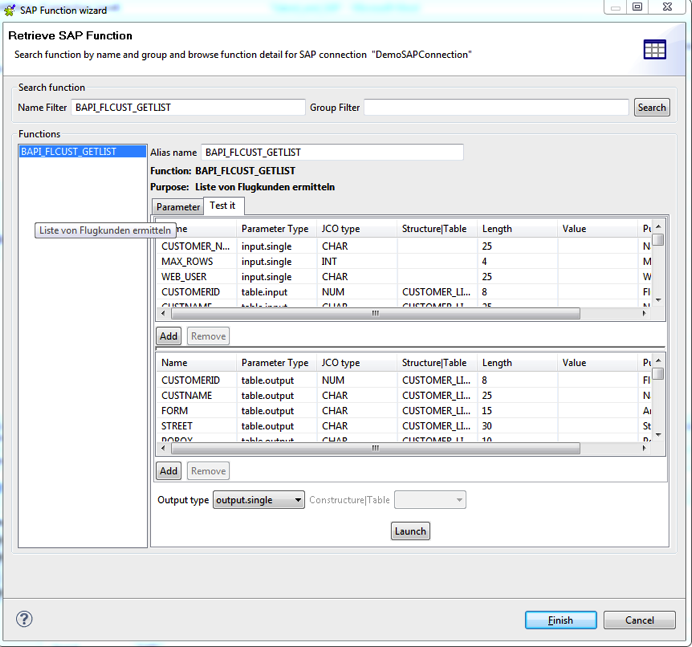
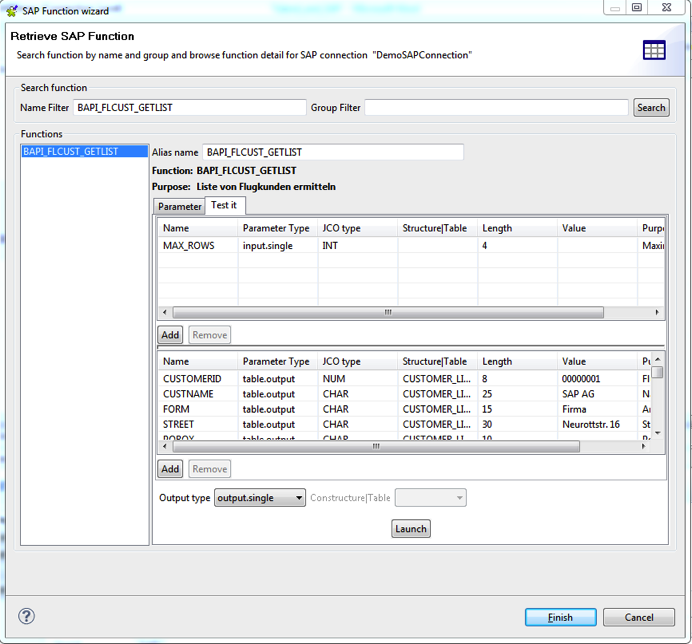
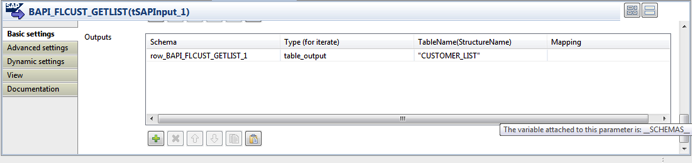
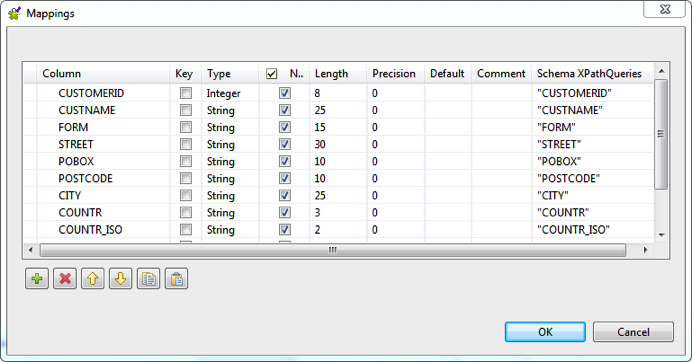
This section describes how to use Talend’s SAP components and the SAP Wizard in general (using one specific example for calling a BAPI). Detailed descriptions of all SAP components (for using BAPIs, RFCs, IDocs, BW, etc.) are available in the documentation Talend_Components_RG_X.Y.Z.pdf at www.help.talend.com.
A connection to a SAP system can be done “built-in” or via “Metadata –> SAP Connections” (the latter only in enterprise version). Using the latter has several advantages:
Development lifecycle for SAP job:
SAP JCO Version: 3
Client: “001”
Userid: “SAP*”
Password: “admin123” –> as you defined it while installation
Language: “EN”
Hostname: “localhost”
System number: “00”
That’s it. Now enjoy Talend’s SAP components 🙂
Best regards,
Kai Wähner (Twitter: @KaiWaehner)
The Industrial IoT Landscape Q4 2026 maps vendors and open source from edge to cloud…
Telecom has more orchestration standards than any other industry, and the maturity stops at the…
Jev by TypeSafe AI returns a calibrated probability instead of text. In a workflow that…
Jev by TypeSafe AI returns typed decisions with calibrated probabilities in a few hundred milliseconds.…
System One models such as Jev by TypeSafe AI answer typed questions with calibrated probabilities…
A working Python cron job moved to Kestra, the open source workflow orchestration platform, without…